TCP vs UDP: When to Use What, and How TCP Relates to HTTP

What is TCP ?
TCP stands for Transmission Control Protocol. It is one of the main protocols of the Internet Protocol suite (often referred to as TCP/IP). It operates at the Transport Layer and is responsible for ensuring that data is delivered reliably and accurately between applications running on different hosts.
TCP is a connection-oriented protocol that means connection must be established between the sender and the receiver before any data can be transferred. This process is known as the "three-way handshake" (SYN, SYN-ACK, ACK).
Once the connection is established, TCP breaks large data sets into smaller packets, sends them across the network, and reassembles them at the destination.
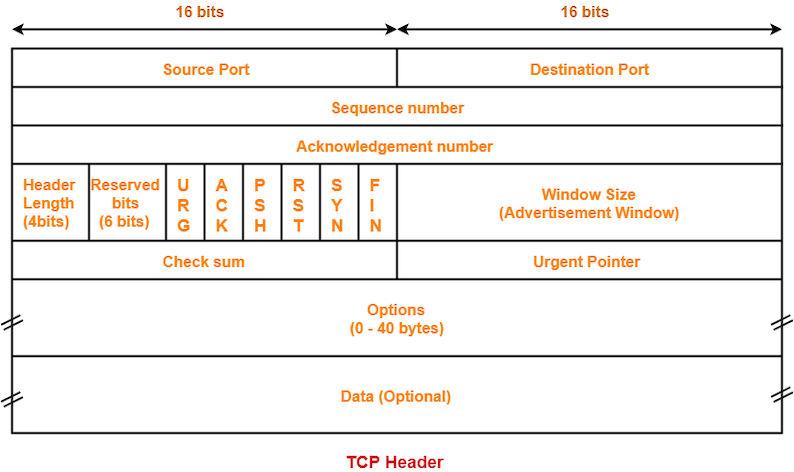
TCP Header Format
Let us discuss some of the important fields of the TCP Header :
Sequence number -: When we establish a new TCP connection, a random 32-bit value is assigned as the initial sequence number. The receiving end uses this sequence number to send back an acknowledgment. The sequence number serves as a mechanism to ensure sequential processing of the segments at the receiving end.
Acknowledgment number -: This 32-bit number is used by the receiver to request the next TCP segment. This value is the sequence number incremented by one. When the sender receives this acknowledgment, it can assume that all preceding data has been received successfully. This mechanism works to prevent any data losses.
Checksum -: It is a 16-bit field used to ensure the integrity of the data being transmitted. The primary purpose of the checksum is to detect data corruption. During transmission over a network, electrical interference, hardware faults etc. can cause bits to flip (changing a 0 to a 1 or vice versa). The checksum ensures that the data received is exactly the same as the data sent.
Flags -: Also known as control bits, flags indicate the purpose of a TCP message. The control bits indicate whether the message is for establishing a connection, transmitting data, or terminating a connection.
ACK - Used for acknowledgments.
RST - Used to reset the connection when there are irrecoverable errors.
SYN - Used for the initial 3-way handshake. The sequence number field must be set.
FIN - Used to terminate the connection.
What is UDP ?
UDP stands for User Datagram Protocol. Like TCP, it operates at the Transport Layer of the internet protocol suite. While TCP is designed for reliability (making sure every bit arrives correctly), UDP is designed for speed and efficiency. It is often referred to as a "fire-and-forget" protocol.
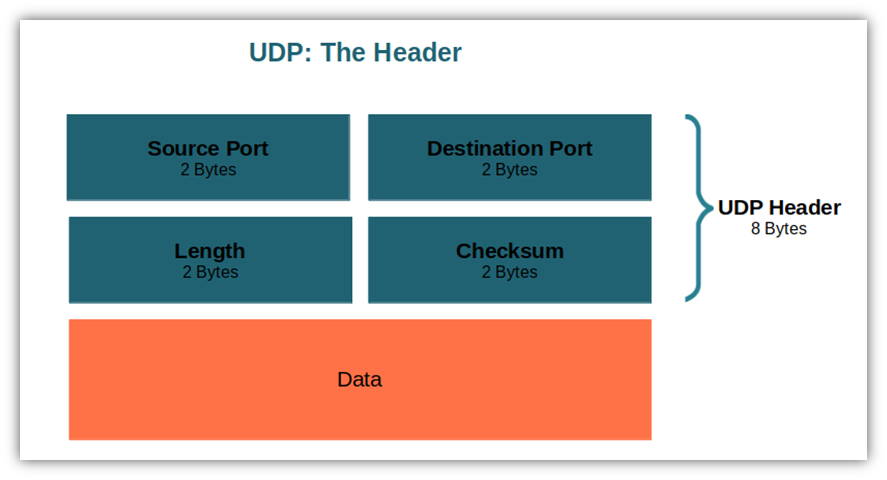
UDP Header Format
Source Port (16 bits) -: Identifies the port number of the application sending the data. It acts as a "return address." If the receiving application needs to reply to the sender, it uses this port number.
Destination Port (16 bits) -: Identifies the port number of the application that should receive the data. When the packet arrives at the destination IP address, the operating system looks at this port number to decide which open application (e.g., a game server, DNS resolver, or video player) should receive the packet.
Length (16 bits) -: Specifies the total length of the UDP datagram, which includes both the Header and the Data. The minimum value is 8 bytes, which represents a UDP packet with a header but no data.
Checksum (16 bits) -: Used to detect errors or corruption in the data during transmission. The sender calculates a value based on the header and data contents. The receiver calculates it again upon arrival. If the values don't match, the data was corrupted.
TCP vs. UDP Comparison
| Feature | TCP (Transmission Control Protocol) | UDP (User Datagram Protocol) |
| Connection Type | Connection-oriented: Requires a formal connection setup (3-way handshake) before data transfer. | Connectionless: Sends data immediately without establishing a connection or checking if the receiver is ready. |
| Reliability | High: Guarantees delivery. If a packet is lost, it is retransmitted. | Low: "Best-effort" delivery. If a packet is lost, it is gone forever. |
| Ordering | Ordered: Packets are numbered and reassembled in the exact order they were sent. | Unordered: Packets may arrive in any order, and the protocol does not reorder them. |
| Speed | Slower: Due to the overhead of establishing connections, error checking, and acknowledgments. | Faster: Very low overhead; simply sends packets as fast as possible. |
| Header Size | Heavyweight: Minimum 20 bytes. | Lightweight: Fixed at 8 bytes. |
| Flow Control | Yes: TCP has congestion control & flow control. Manages data flow to prevent overwhelming the receiver. | No: UDP doesn’t have flow control & sends data even if the network is congested. The sender can flood the receiver with packets, potentially causing packet loss. |
| Error Checking | Extensive: Checks for corruption and requests retransmission if errors are found. | Basic: Checks for corruption (checksum) but simply discards bad packets without requesting retransmission. |
| Handshake | SYN, SYN-ACK, ACK: Requires a 3-way handshake to start. | None: No handshake required. |
| Best Use Cases | Web browsing (HTTP/HTTPS), Email (SMTP/IMAP), File transfers (FTP), SSH. | Online gaming, Live video streaming, VoIP (Voice over IP), DNS lookups. |
What is HTTP ?
HTTP stands for HyperText Transfer Protocol. HTTP is an Application Layer protocol designed to transfer information between devices. It follows a Client-Server model:
Client (e.g. a Web Browser, mobile device etc.): Sends an HTTP Request asking for a specific resource (like an HTML file, an image, a JSON data etc.).
Server: Processes the request and sends back an HTTP Response, which includes the requested data and a status code (e.g.,
200 OK,404 Not Foundetc).
HTTP Characteristics
Stateless: Each request is independent. The server does not "remember" the previous request from the same client (unless cookies/sessions are used).
Text-Based: HTTP messages are essentially plain text (though the body can contain binary data like images).
The Relationship Between TCP and HTTP
HTTP works on top of TCP. HTTP is a Application Layer protocol while TCP is a Transport Layer protocol.
HTTP (Application Layer): Defines what the data is and how it is formatted (headers, methods like GET/POST). It cares about the content of the conversation.
TCP (Transport Layer): Defines how the data gets from point A to point B reliably. It cares about the delivery of the conversation.
How TCP and HTTP Work Together:
When you type a URL into your browser, the browser (HTTP) needs to send a request message to the server.
However, HTTP cannot send data across wires itself. It hands the message down to TCP.
TCP establishes a connection with the server (using the 3-way handshake).
TCP breaks the HTTP message into smaller packets, numbers them, and ensures they arrive at the server without errors.
Once the packets arrive at the server, TCP reassembles them into the original HTTP message and hands it up to the server's web software (like Apache or Nginx)


